 Pak
PakPak Game Login
Step-by-step Pak Game login and registration for Pakistan — plus password recovery and fixes for when login won’t work. English and Urdu friendly.
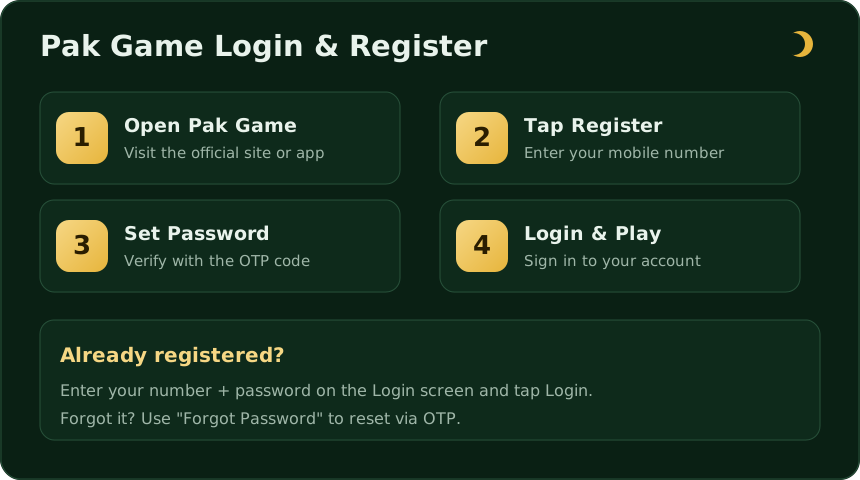
Logging in to Pak Game takes under a minute once your account exists. This guide covers both sides of it — signing in if you already have an account, and registering from scratch if you don’t — with the exact steps you’ll see on screen. If the app isn’t installed yet, grab it from the Pak Game download page first.
How to log in to Pak Game
- Open the Pak Game app (or the official site) on your phone.
- Tap Login on the welcome screen.
- Enter your registered mobile number and your password.
- Tap Login. Your account dashboard and balance will load.
If nothing happens, double-check that the number matches the one you registered with and that the app is the latest version.
How to register a Pak Game account
New players need an account before they can log in. Registration is free and uses your mobile number for verification.
- Open the app and tap Register (or Sign Up).
- Enter your mobile number.
- Create a strong password — mix letters and numbers.
- If you have one, paste your invitation code in the referral field.
- Submit, then enter the OTP sent to your phone to verify.
- Your account is ready — log in and you’re set.
Forgot your password?
Password recovery is built into the login screen:
- Tap Forgot Password below the login fields.
- Enter your registered mobile number.
- Receive an OTP by SMS and enter it.
- Set a new password and log in again.
Pick a password you don’t reuse on other apps, and never share the OTP with anyone who messages you claiming to be “support”.
Pak Game login not working? Quick fixes
- Wrong details: re-type the number and password carefully; check for an accidental space.
- Old app version: reinstall the latest APK from the download page.
- Weak connection: switch between Wi-Fi and mobile data and retry.
- Account locked: too many wrong attempts can pause login — wait a few minutes, then reset the password.
Account safety tips
Because Pak Game holds real money, treat your login like a bank login. Keep your password private, enable any in-app security options, log out on shared devices, and be sceptical of anyone offering “free balance” in exchange for your OTP or password — that is always a scam. For the bigger picture on legitimacy and safe play, read our is Pak Game real or fake guide.
App login vs web login
You can usually reach your account two ways: through the installed Android app or through the official site in a mobile browser. The credentials are the same — one mobile number and password unlock both. The app is the smoother option because it keeps you signed in, loads rounds faster, and sends notifications. If you mainly use the browser version, bookmark the genuine address so you never log in on a look-alike clone site. When in doubt, install the app from our download page and log in there.
OTP not arriving? Here’s what to check
The one-time password (OTP) is the SMS code that verifies your number at registration, password reset, and sometimes login. If it doesn’t come through:
- Confirm you typed the correct mobile number with the right network prefix.
- Check signal — move to an area with better reception and wait a minute before retrying.
- Look in your phone’s spam or blocked-messages folder.
- Don’t request a new code repeatedly in quick succession; that can temporarily block further codes.
- If it still fails, your number may be on a Do-Not-Disturb SMS filter — many networks let you disable that by sending a short code.
Never read your OTP aloud to anyone, and never paste it into a chat. A genuine login screen is the only place it belongs.
Updating your details
Profile settings inside the app let you manage your password and basic details. Changing the registered mobile number is more sensitive because it is tied to verification — if the app allows it, expect an OTP to both the old and new number. If you can’t change something yourself, only use the app’s official in-app support; this guide site cannot edit your account.
Logging out and switching accounts
On a shared or borrowed phone, always log out when you finish — look for the logout option in the profile or settings menu. If you manage more than one account, sign out fully before signing into another rather than leaving sessions open. Leaving yourself logged in on someone else’s device is the most common way balances get misused.
Account locked or suspended?
If your Pak Game login is blocked, work through the likely causes in order. Too many wrong password attempts can trigger a short cooldown — wait a few minutes, then reset your password via OTP. A suspended account is different: it usually points to a terms issue (for example, multiple accounts on one device or a payment dispute) and can only be resolved by the app’s own in-app support, not by this guide site. When you contact support, never share your password or OTP; a genuine support process never needs them. Keep one account per person, use a strong unique password, and most lock-outs simply never happen.
Common questions
How do I log in to Pak Game?
I forgot my Pak Game password — what now?
Why is my Pak Game login not working?
Can I use one account on two phones?
Is it safe to log in to Pak Game?
My Pak Game account is locked — how do I unlock it?
The OTP code isn't arriving — what should I do?
Get into your account
Install the latest app, then log in or register in under a minute. Play responsibly — 18+ only.
Open Pak Game